Instead of reaching for some fancy SAAS, if you just want a basic search complete with the power of vectors, then look no further than SQLite.
SQLite comes with some off the shelf extensions, plus some plug and play ones that make building a hybrid search engine really easy.
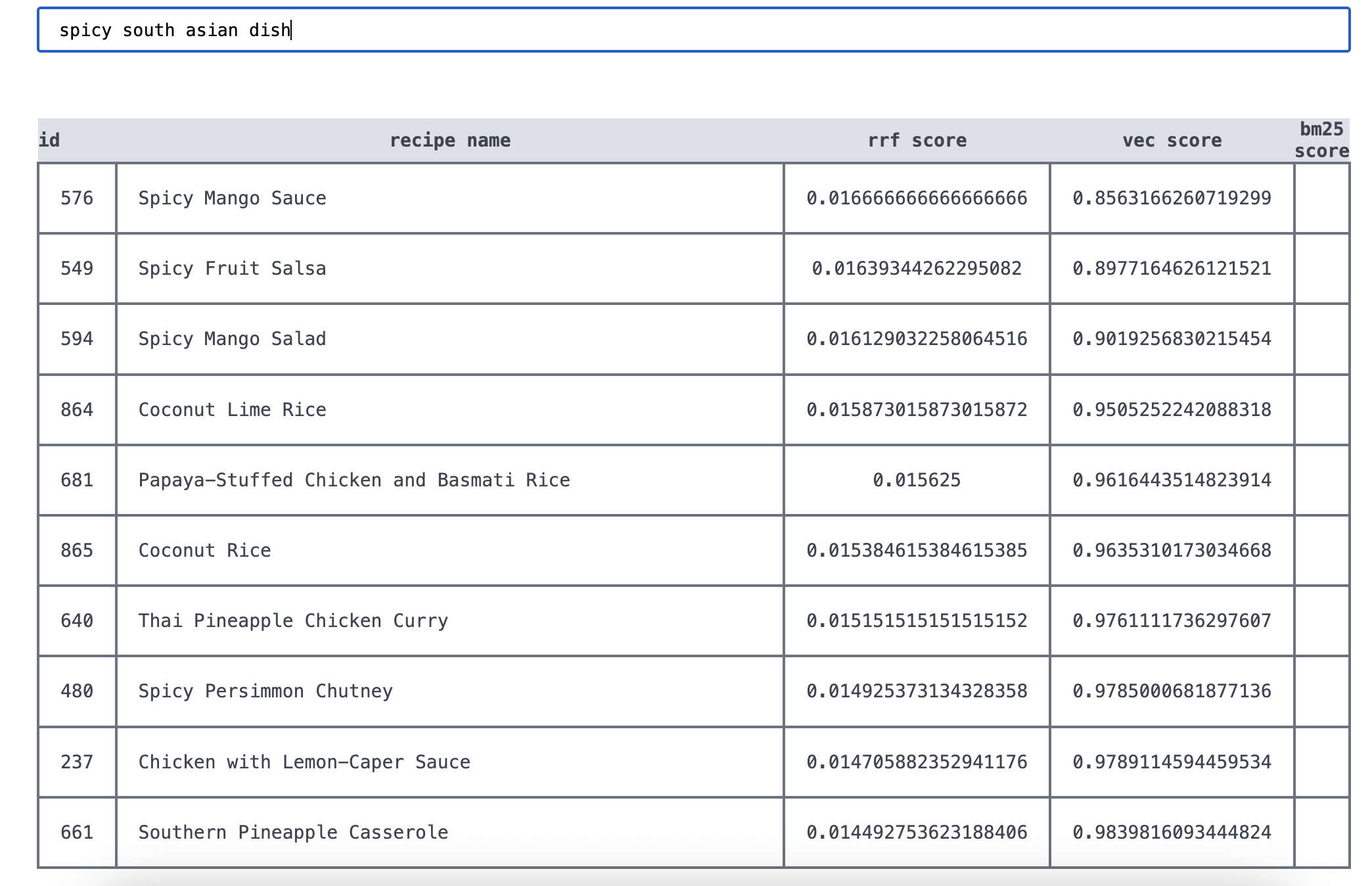
I'm going to walk you through building one such engine. We'll be using some food recipes as our test data and by the end of it we'll be able to handle lexical queries like quesadillas as well as semantic queries like grandma's comfort food or spicy south asian dish and using a blending algorithm to mix lexical and semantic search results.
Get started
Find the repo that accompanies this tutorial here
I'm going to be working off a dataset you can download here: recipes and add it to the root of your project now. Only the relevant fields we will use for this project have been included. Everything else is stripped away.
First let's create the scaffold for our project, we're going to be using Python as the engine language. mkdir <your-project-directory>, cd into it then create and source a virtual python environment.
python3 -m venv venv
source venv/bin/activate
We're going to be using a SQLite extension called sqlite-vec for this tutorial to power the vector embeddings. But first we have to check if our version of Python allows us to use extensions. Run:
python3 -c "import sqlite3; print(hasattr(sqlite3.Connection, 'enable_load_extension'))"If this shows False, you need to use a different Python version that allows extensions to be loaded. For me, it's my brew version, so i'll be changing my virtual env:
/opt/homebrew/bin/python3 -m venv venv
source venv/bin/activate
You can of course skip all this and instead use uv or something similar.
Creating databases
First we need to create our database tables. We need three:
- A regular table to hold our raw recipe data.
- A virtual table to hold our keyword search index.
- A virtual table to hold our vector embeddings for semantic search.
For tables #2 and #3, we can leverage some SQLite extentions, fts5 for lexical search and sqlite-vec for semantic search.
Fts5 is part of the standard library, but you will need to install sqlite-vec:
pip install sqlite-vecCreate a schema.sql file at the root of your project with the following entries:
DROP TABLE IF EXISTS recipes;
DROP TABLE IF EXISTS search_index;
DROP TABLE IF EXISTS vec_index;

CREATE TABLE IF NOT EXISTS recipes(
  id INTEGER PRIMARY KEY AUTOINCREMENT,
  recipe_id INTEGER,
  name TEXT NOT NULL,
  ingredients TEXT NOT NULL
);

CREATE virtual TABLE IF NOT EXISTS search_index USING fts5(
  name,
  ingredients,
  content='recipes',
  content_rowid='id'
);

CREATE VIRTUAL TABLE IF NOT EXISTS vec_table USING vec0(
  id INTEGER PRIMARY KEY,
  embedding float[384]
);
These tables are pretty self explanatory, the fts5 table has content and content_rowid entries which reference external content tables, in our case, the recipes table.
The vec_table will store vector embeddings of 384 dimensions as well as the doc id. For our embeddings we will be using all-MiniLM-L6-v2, which has 384 dimensions, so our embeddings vector is 384 dimensions long.
The first thing we want to do is to be able to initialise our database. In main.py add the following:
import os
import sqlite3
import sys
import sqlite_vec

def get_db():
    DATABASE = "recipes.db"
    if not os.path.exists("recipes.db"):
        with open("recipes.db", "w+") as f:
            pass
    conn = sqlite3.connect("recipes.db")
    conn.enable_load_extension(True)
    sqlite_vec.load(conn)
    conn.enable_load_extension(False)

    return conn

def init_db():
    conn = get_db()
    with open("schema.sql") as f:
        conn.executescript(f.read())

if __name__ == "__main__":
    func_name = sys.argv[1]
    if func_name == "init_db":
        init_db()
This does a few things. get_db will be used throughout the app to get a connection to the database. If the database file doesn't exist, it first creates it. init_db is the most important function here, it first gets a database connection, loads the sqlite-vec extension and then executes the schema.sql file to initialise the database.
The bottom part allows us to run the init_db command from the terminal, which we can now do. Navigate to the root of your project and run:
python3 main.py init_dbAll going well, your db should be initialised with the appropriate tables. I use DB Browser for SQLite to look at my tables. It should look something like this:
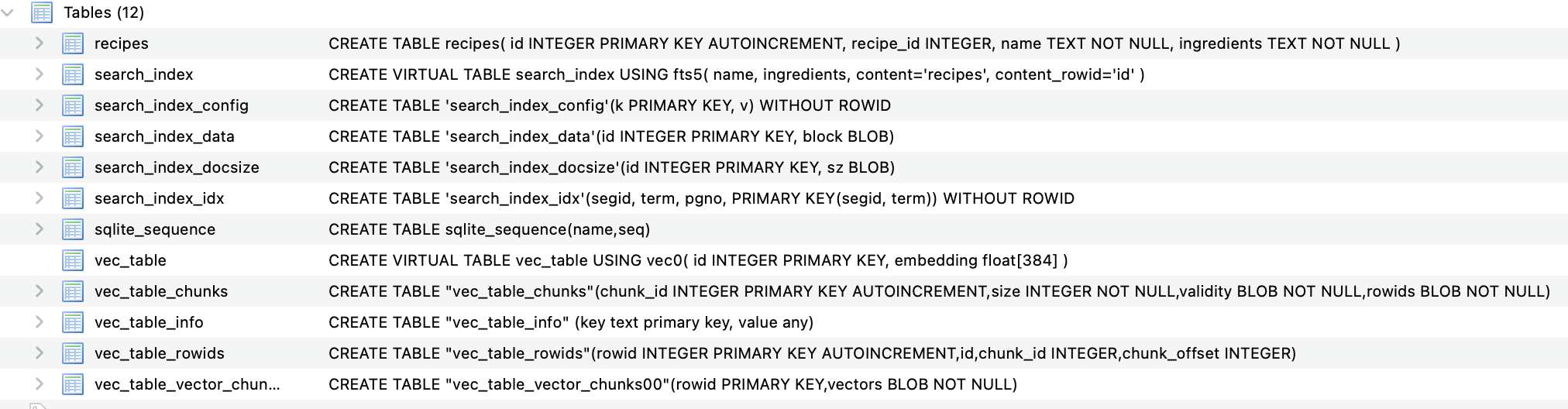
As you can see, the virtual tables have done a lot of work here and createdsome additional tables for us, most importantly for us is the search_index and the vec_table, which are our keywords search index and vector embeddings index, respectively.
Seeding databases
We need to add some data to these tables. We're going to do this in one big, ugly function, because splitting up is too much for a tutorial.
As we will be seeding the vector table, we need to generate embeddings. To do this we're going to use sentence transformers and the all-MiniLM-L6-v2 model.
Install sentence-transformers:
pip install sentence-transformersLoad an initialise at the top of main.py:
from sentence_transformers import SentenceTransformer
model = SentenceTransformer("all-MiniLM-L6-v2")
You'll notice that each time we run our script now, the model has to load, which is annoying, but a necessary pain we have to suffer for this tutorial. If you want to go the extra mile, hook this up to a Flask or FastAPI app and serve the model persistently and this problem would be solved.
def seed_db():
    conn = get_db()

    # Seed recipes table
    with open(os.path.join(os.getcwd(), "data/data.json")) as f:
        json_data = json.load(f)
        rows = [(r["id"], r["name"], r["ingredients"]) for r in json_data]
        cur = conn.cursor()
        cur.executemany(
            "INSERT INTO recipes (recipe_id, name, ingredients) VALUES (?, ?, ?)",
            rows,
        )

    # Seed fst5 table
     cur.execute(
        "INSERT INTO search_index(rowid, name, ingredients) SELECT rowid, name, ingredients FROM recipes"
    )

    # Seed vector table
    cur.row_factory = sqlite3.Row
    documents = cur.execute("SELECT id, name, ingredients FROM recipes").fetchall()
    document_titles = [doc["name"] for doc in documents]
    embeddings = model.encode(document_titles)

    docs_with_embeddings = []
    for i, doc in enumerate(documents):
        doc_tuple = (doc["id"], embeddings[i])
        docs_with_embeddings.append(doc_tuple)

    cur.execute("CREATE VIRTUAL TABLE IF NOT EXISTS vec_table USING vec0(id INTEGER PRIMARY KEY, embedding float[384])")

    with conn:
        for doc in docs_with_embeddings:
            conn.execute("INSERT INTO vec_table(id, embedding) VALUES(?, ?)",
                        [doc[0], serialize_float32(doc[1])]
                       )
This function is pretty self explanatory. For the recipes table, it seeds this table using the recipes.json data. The fts5 table can be built automatically from our new recipes table. vec_table is a different. We need to populate this table both the doc if and its embedding in a tuple format (which is what SQLite expects) of: (<doc_id>, [<embeddings>]).
To generate the embeddings, we first grab all the names of our recipes from the recipes table (we are just using names but you could just as well concatenate name + ingredients or another semantically rich field). We run all these sentences through the embedding model. The result is an embeddings shape of (961, 384), being 961 recipes, each with an embedding length of 384, which represents the number of dimensions in the embedding model.
Run the seed function:
python3 main.py seed_dbIf you inspect the tables now you should see that they are populated. You wo't however, see a neat list of vector chunks for the vec tables, this is normal.
Query the data
Right now you should have a project structure like this:
├── main.py
├── README.md
├── recipes.db
├── recipes.json
├── schema.sql
└── venv
With recipes.db containing the three primary tables: recipes, search_index and vec_table.
With these complete, we can start querying our data. Create a new file at the root of the project called search.py. The search function will get a bit weighty, so we will be using a separate file for this.
The way it's going to work is we will run two queries:
- A lexical fts5 search
- A semantic sqlite-vec search
And then blend the results using Reciprocal Rank Fusion (RRF), discussed in more detail later.
Keyword search
Create a search function in the search.py file like so:
# search.py
import sqlite3

def search(query: str, limit: int, conn: sqlite3.Connection) -> list[dict]:
    # Keyword results
    cur = conn.cursor()
    cur.row_factory = sqlite3.Row
    safe_query = f'"{query}"'
    kw_results = cur.execute(
        """
        SELECT
            rowid as id,
            *,
            -bm25(search_index, 8.0, 2.0) as kw_score
        FROM search_index
        WHERE search_index MATCH ?
        ORDER BY kw_score DESC
        LIMIT ?
        """,
        (safe_query, limit),
    ).fetchall()
    return [dict(row) for row in kw_results]
If you're used to SQL queries this should be pretty self explanatory, except for the bm25 stuff. BM25 is an industry standard keyword ranking algorithm that estimates the relevancy of document. We can run the bm25 function in our SELECT statement and store the result in kw_score, which we then use to rank the documents. We reverse the bm25() function because by default it's returned as a negative value. This is just more intuitive for us as we make sense of scoring a bit later.
The weights 8.0 and 2.0 are relative weights to score the recipe fields name and ingredients. We are basically saying "the name field is 4x more important than the ingredients field" when ranking documents.
Back in main.py, wire up a simple search function:
# main.py
from search import search
# .... rest of imports and functions

def perf_search(query: str, limit: int):
    conn = get_db()
    kw_results = search("apple", limit, conn)
    print(kw_results)

if __name__ == "__main__":
    # .... rest of the other stuff here
    if func_name == "search":
        perf_search(sys.argv[2], sys.argv[3])
Run the search function from the command line:
python3 main.py search "easy apple cider" 10You should get a handful of results back.
Vector search
Let's now get back the vector results for the same query.
For this we need to pass the all-MiniLM-L6-v2 model that we initialised in main.py and pass it to the search function. We'll also import the SentenceTransformer class for type hinting. The function definition should look like this:
# search.py
from sentence_transformers import SentenceTransformer

def search(query: str, limit: int, conn: sqlite3.Connection, model: SentenceTransformer) -> list[dict]:
    #.... rest of the func
Back in main, when you call search(), pass the model in to the function call, we'll also now get back both keyword and vector results.
# main.py
def perf_search(query: str, limit: int):
    conn = get_db()
    kw_results, vec_results = search(query, 10, conn, model)
    print(kw_results, vec_results)
In the search function add the following block to get back vector results:
# search.py
query_embedding = model.encode(query)
vector_results = cur.execute(
    """
    SELECT
        r.*,
        v.distance as vec_score
    FROM vec_table v
    JOIN recipes r ON r.id = v.id
    WHERE v.embedding MATCH ?
    AND k = ?
    ORDER BY v.distance
    """,
    [serialize_float32(query_embedding), limit],
).fetchall()

return kw_results, vector_results
This query looks a bit funky, bit if we break it down, it's pretty simple. r* returns all fields from our recipes table. The JOIN statement connects our embeddings to its corresponding recipe. WHERE matches vector embeddings that match our query embedding. k is used in K-Nearest Neighbour (KNN) algorithms to return the top k nearest neighbours. You can think of it as a limit to the number of vector results to return. Results are returned by their distance, which is the cosine distance between the query embedding and the recipe embedding.
Update the perf_search() function:
def perf_search(query: str, limit: int):
    conn = get_db()
    kw_results, vector_results = search("apple", 10, conn, model)
    print(kw_results)
    print("---------\n")
    print(vector_results)
If we run a search now we should have two separate lists of results:
python3 main.py search "apples" 2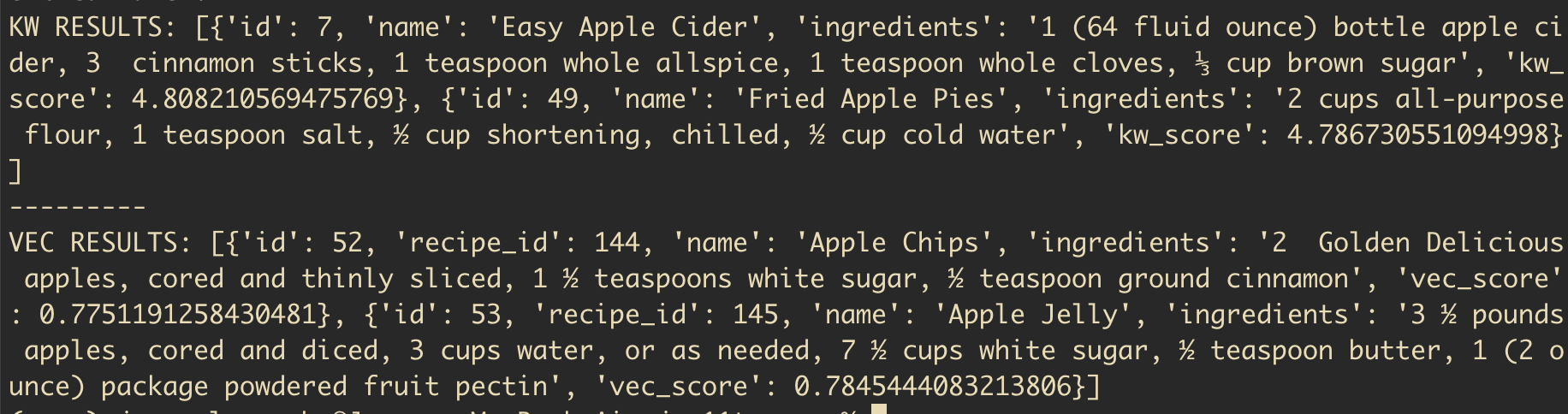
To show the power of vector search, we can now run an ambiguous, semantic query like
python3 main.py search "grandma's comfort recipes" 5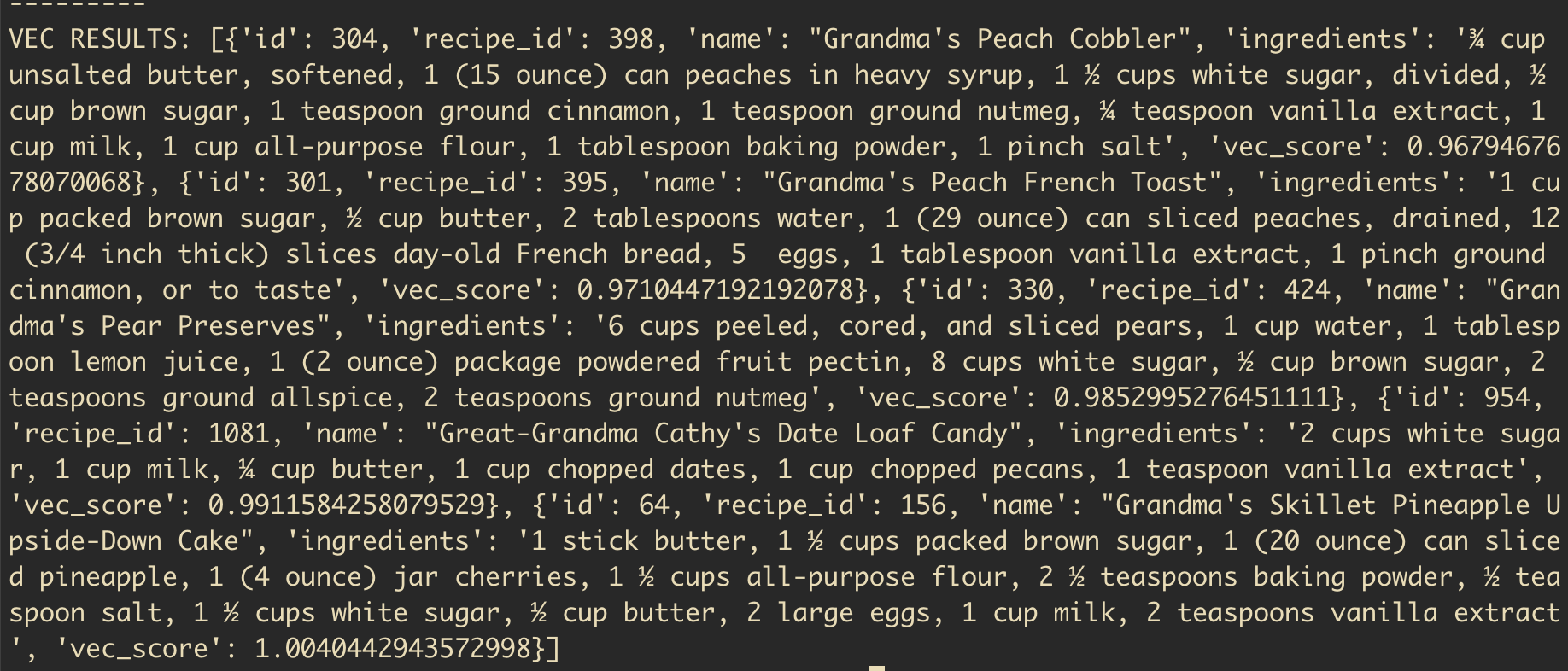
As you can see, the power of vectors has given us, among others:
- Grandma's peach cobbler
- Grandma's french toast
- Great-Grandma Cathy's Date Loaf Candy
Which are pretty accurate hits.
Hybrid search
Now we have keyword results and vector results, we can work on blending the two. As you can see from both lists of hits we have scores for the results: kw_score and vec_score. This is what we are using to order our results from most > least relevant for the query. This begs the question, is our bm25 scores are between 0-100+ and the vector scores are between 0-1 how could we go about combining these scores and creating a single list of "hybrid" results.
We could go about normalising the scores to combine them (one such method called minmax normalisation is common), but it can get messy pretty quickly. Instead we can use a simple method called Reciprocal Rank Fusion (RRF).
Reciprocal Rank Fusion
It's an intimidating name, but it's all bark, no bite. RRF lets us combine two lists into a single combined and ordered list.
It works by grabbing the rank of each document in each list (rank here being where it appears in the list, not its actual "score") and dividing 1 by the rank in the list. If the document appears in both lists, then we add 1 divided by that document's rank in each list. This means documents that appear in both lists should have a higher score generally, which makes sense. If a peach cobbler appears in both lists for the query "sweet cobbler recipe" then this is a strong signal that it is relevant for that query.
Assume one document appears in both our keyword hits and our vector hits. It's position 2 in keyword and 6 in vector:
1/2 + 1/6 = 0.66666667Simple eh? Let's implement this logic in our search.py file.
Above our main search function add an rrf() function:
def rrf(kw_results: list, vec_results: list) -> list[float]:
    k = 60
    rrf_scores = {}

    kw_ranks = {d["id"]: i + 1 for i, d in enumerate(kw_results)}
    vec_ranks = {d["id"]: i + 1 for i, d in enumerate(vec_results)}
    vec_kw_union = kw_ranks | vec_ranks.keys()

    for doc in vec_kw_union:
        score = 0

        if doc in kw_ranks:
            score += 1 / (k + kw_ranks[doc])

        if doc in vec_ranks:
            score += 1 / (k + vec_ranks[doc])

        rrf_scores[doc] = score

    final_scores = sorted(rrf_scores.items(), key=lambda x: x[1], reverse=True)
    return final_scores
Luckily for us, both sets of results have already been returned ordered so all we need to do, so we can just grab the index of the document in its corresponding list and that is it's rank in the list. kw_ranks and vec_ranks gives us the document id and score: 44: 1, for example.
Combining the dictionaries into vec_kw_union gives us a deduplicated dict of document ids. We then loop through these keys, if that key is in one or more lists, we calculate its score. The k = 60 is a smoothing constant that controls how much influence the rank position has over the final score. 60 is a typical value, but if you want rank to be more important, you can reduce it down to something smaller.
The final scores here is a dictionary of doc ids and their scores.
At the bottom of search() we will now return these docs and their scores:
# search.py
def search():
    # ... rest of search function
    final_rankings = rrf(kw_results_as_dict, vector_results_as_dict)
    return final_rankings
Back in main.py we'll just print out the final RRF docs:
#  main.py
def perf_search(query: str, limit: int):
    conn = get_db()
    rrf_docs = search(query, limit, conn, model)
    print(rrf_docs)
Run the following in your terminal:
python3 main.py search "sweet apples" 5The output should be something like this:
[(44, 0.03278688524590164), (20, 0.03200204813108039), (10, 0.03149801587301587), (32, 0.016129032258064516), (15, 0.015625), (50, 0.015384615384615385), (3, 0.015384615384615385)]Notice how the changes are minimal between docs? This is thanks to the k smoothing constant.
The last thing we need to do is take these tuples and return the recipe information for each tuple document.
Back in search.py we'll add the following to the end of the file:
# search.py
final_results = []
temp_id_store = []

for item in final_rankings:
    doc_id = item[0]
    rrf_score = item[1]
    new_dict = {
        "id": doc_id,
        "rrf_score": rrf_score
    }

    for result in kw_results_as_dict:
        if result["id"] == doc_id and doc_id not in temp_id_store:
            new_dict = {**new_dict, **result}
            final_results.append(new_dict)
            temp_id_store.append(doc_id)

    for result in vector_results_as_dict:
        if result["id"] == doc_id and doc_id not in temp_id_store:
            new_dict = {**new_dict, **result}
            final_results.append(new_dict)
            temp_id_store.append(doc_id)
        elif result["id"] == doc_id and doc_id in temp_id_store:
            new_dict["vec_score"] = result["vec_score"]

return final_results
This loops through the RRF ranked docs, grabs the relevant recipe information from our original database queries and adds a kw_score and / or vec_score to the doc, as well as the recipe information.
Back in main.py let's make our print statement a bit prettier:
#main.py
for doc in rrf_docs:
    print(f"""
    ID: {doc["id"]}
    Name: {doc["name"]}
    KW score: {doc.get("kw_score") if doc.get("kw_score") else "none"}
    Vector score: {doc.get("vec_score") if doc.get("vec_score") else "none"}
    RRF score: {doc["rrf_score"]}
    """)
Now when you run a query you should see something like this:
ID: 282
Name: Crisp Peach Cobbler
KW score: 7.2437991570923135
Vector score: 0.739494800567627
RRF score: 0.03252247488101534

ID: 59
Name: Fresh Cherry Cobbler
KW score: none
Vector score: 0.6865301132202148
RRF score: 0.01639344262295082

ID: 598
Name: Mommy's Mango Cobbler
KW score: 7.2437991570923135
Vector score: none
RRF score: 0.016129032258064516
If you run a semantic only query like "grandma's comfort food" you should see docs only with a vec_score and no kw_score
That's it! Hope you found this useful.
Big thanks to Alex Garcia whose guides on Vector search with SQLite were super useful, not to mention that he's the author of sqlite-vec!